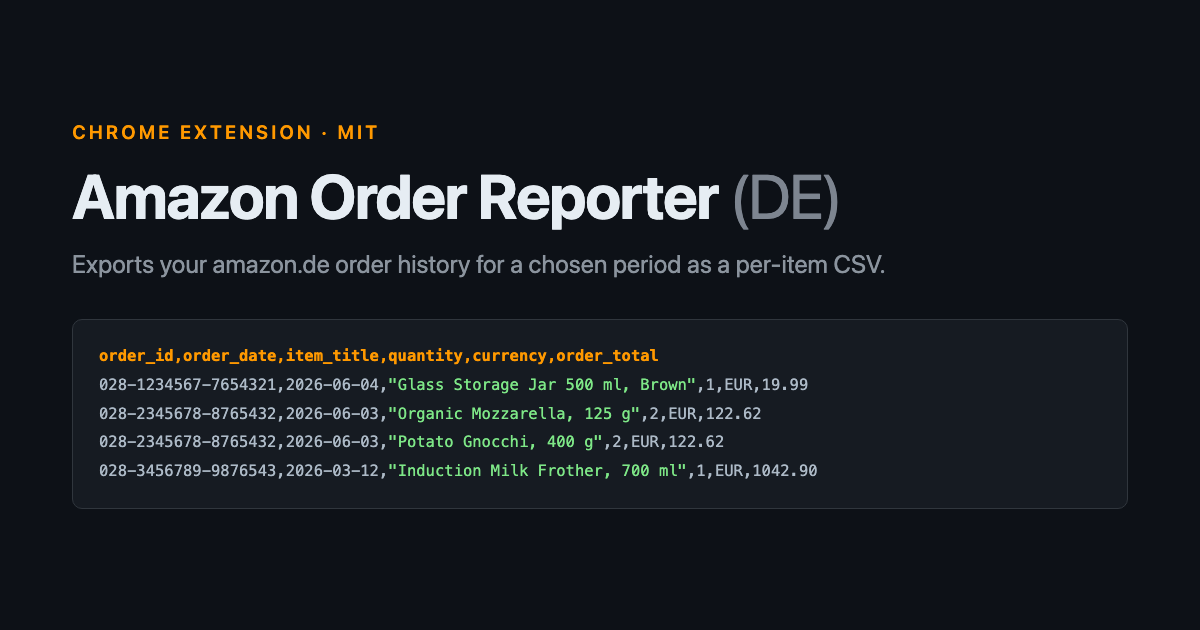
Amazon shows you your order history and gives you no way to export it. The “order history report” feature exists on amazon.com but not on amazon.de. If you want the data in a spreadsheet, you copy it by hand or you scrape it.
Amazon Order Reporter is a Manifest V3 Chrome extension that exports amazon.de order history for a chosen period as a per-item CSV: one row per product, not per order. It is MIT licensed and runs entirely in your own browser session.
Why it reads the DOM instead of fetching
The obvious approach is to fetch the orders URL in the background and parse the HTML. Amazon’s order history is a React application, and a plain fetch() of /your-orders/orders returns an empty shell with no order data in it.
So the extension navigates a real tab, waits for the page to hydrate, and reads the live DOM through a content script. That constraint shapes everything else: the crawl has to drive a visible tab, one page load at a time.
The first version worked, in the sense that it produced a file. Then three things turned out to be wrong with it.
It only ever exported ten orders
Amazon paginates the order list at ten orders per page. The extension loaded the first page and stopped. A calendar year is typically five or more pages, so the CSV was silently truncated to the first ten orders with no indication anything was missing.
The fix is not just “loop until there are no more pages”. The extension built pagination URLs with &startIndex=10, the parameter amazon.de used when the code was written. It now uses a zero-indexed ?page=. Rather than encode either convention, the crawl reads the href out of the DOM:
function nextPageHref(html, domParser) {
  const doc = typeof html === 'string' ? domParser.parseFromString(html, 'text/html') : html;
  const last = doc.querySelector('.a-pagination .a-last');
  if (!last) return '';
  if (String(last.getAttribute('class') || '').includes('a-disabled')) return '';
  const a = last.querySelector('a');
  return a ? String(a.getAttribute('href') || '') : '';
}
Following Amazon’s own “Next” link survives them changing the parameter again, and it preserves the period filter automatically.
Grocery orders exported as blank rows
Ordinary orders put the product name in a link with the class yohtmlc-product-title. Grocery and Amazon Fresh orders do not. They render as a thumbnail grid, where the only product name is the image alt attribute and the count sits in a product-image__qty badge.
The scraper had exactly one selector, so those orders matched nothing and fell through to a fallback that emitted a single blank row. On one captured page, three of ten orders were grocery baskets. One of them contained sixteen items and exported as one empty line.
Item extraction now walks .item-box tiles and takes whichever title is present:
const link = box.querySelector('.yohtmlc-product-title a');
const img = box.querySelector('img[alt]');
const title = link ? textOf(link) : (img ? img.getAttribute('alt').trim() : '');
if (!title) continue;
The continue matters. Amazon caps the grid and puts the remainder behind a tile with no image and no title, so without that check every grocery order gained a trailing blank row. The same page went from 10 rows to 52.
One limit cannot be fixed from the list page: Amazon renders about fifteen thumbnails per basket and hides the rest behind that same “+N more” tile. Getting the full basket would mean opening every order’s detail page, which is hundreds of extra requests.
The popup was the wrong place for the crawl
Chrome destroys an extension popup as soon as it loses focus. The first version ran the entire crawl inside it. That is survivable for a single page load, and it is not survivable for five, which take a minute or two. When the popup died mid-run it took the job and the error message with it, which from the outside looks identical to nothing happening.
The crawl now lives in the background service worker. It writes every state change to chrome.storage.local, and the popup is only a view onto that. You can close it, reopen it, and see the running count or the error from a run that failed ten minutes ago.
One detail worth knowing if you do this: a service worker has no URL.createObjectURL, so the usual blob-URL download does not work there. The CSV goes out as a base64 data: URL instead. The finished CSV is also kept in storage, so a refused download can be retried without re-crawling.
The test fixture is synthetic on purpose
The scraper tests need a realistic orders page, and a real capture of a signed-in one carries the account holder’s name, delivery address, order numbers, customer ID and CSRF tokens. None of that belongs in a public repository.
What the scraper depends on is the markup shape, not the values, so the repository generates its fixture from build-fixture.js, which reproduces Amazon’s class names and nesting with invented data, including the awkward cases: a grocery thumbnail grid, a “+N more” overflow tile, German date wording with comma decimals, and a refund with a negative total. That is 25 tests against 7 KB of HTML instead of 939 KB of personal data.
Installing it
It is not on the Chrome Web Store. Clone the repository, open chrome://extensions, turn on Developer mode, and use “Load unpacked” on the folder containing manifest.json. Full instructions are in the README.
The selectors target amazon.de’s current markup, and Amazon changes it. When that happens the symptom is “No orders found for this period” or a CSV full of blank titles, and the repository documents which selector maps to which piece of the page.