Claude Code sessions in iTerm2 all show the same tab title. With five sessions open, the tab strip has five tabs that look the same, and the only way to find the right one is to click through them.
tab-tag is a small Claude Code mod that changes this. It gives each session’s tab a colour when the session starts, and it names the tab with one or two uppercase words taken from the first prompt. The source is on GitHub under the MIT licence.
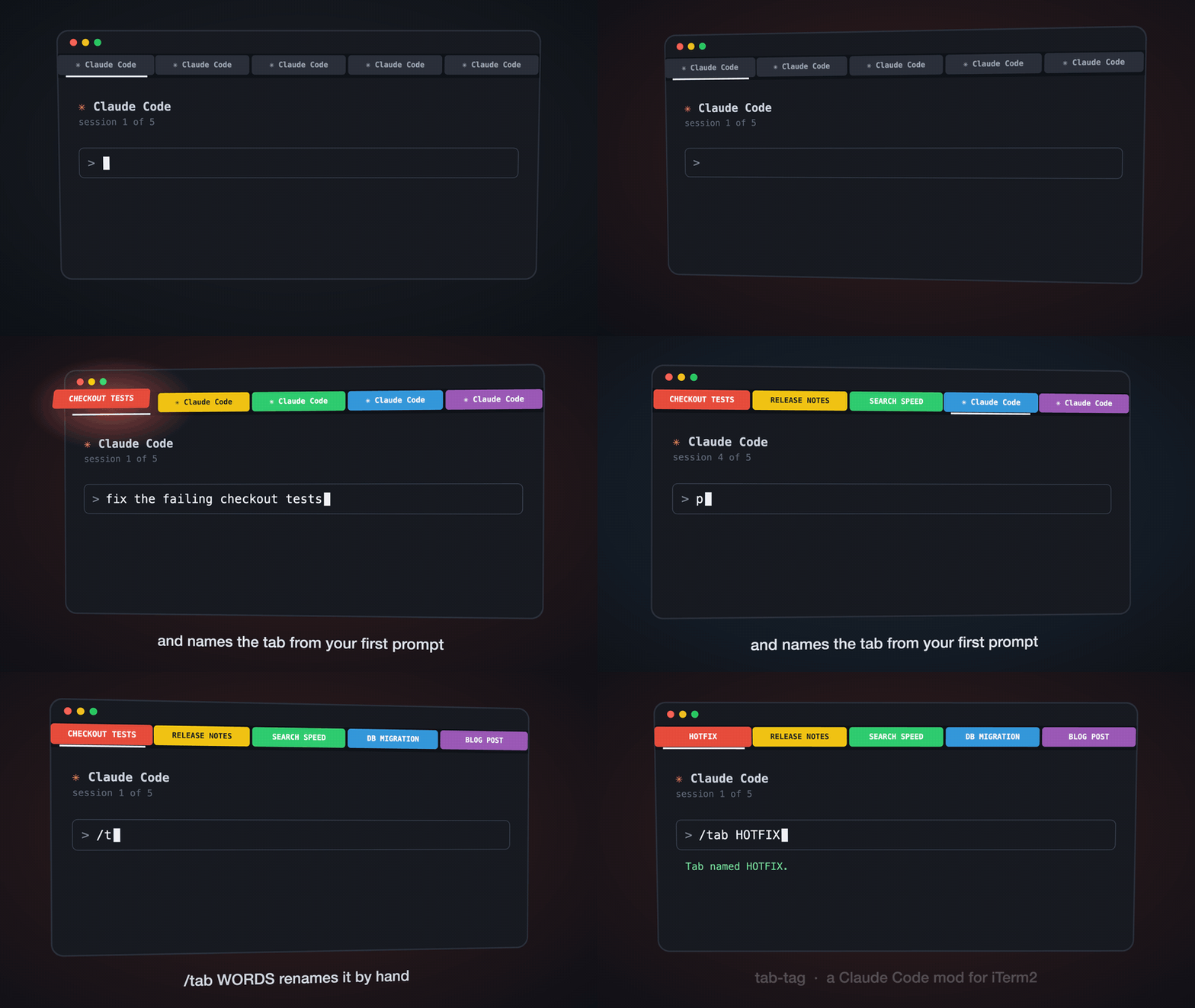
What it does
- When a session starts, the tab gets a random colour from a palette of twelve, and the name of the folder the session started in.
- When you send the first prompt, the tab is renamed to one or two uppercase words for the subject of the prompt, for example
CHECKOUT TESTS. - If the first prompt is a slash command, the name of the command becomes the name of the tab.
/release-notesgivesRELEASE NOTES. Commands that say nothing about the subject, such as/clearor/model, are skipped, and the next prompt names the tab. /tab HOTFIXnames the tab by hand./tabwith no words names it again from the last six prompts of the conversation.- A resumed session gets back the colour and the name it had.
- When the session ends, the tab goes back to the iTerm2 default.
A tab is named once. Later prompts do not rename it, so the name does not move while you work.
Where the name comes from
The name comes from one model call per session. The mod sends the first 1,500 characters of the first prompt, and the reply is limited to 16 tokens. The default model is Claude Haiku 4.5. The system prompt is short:
You label terminal tabs. Reply with ONE or TWO words, uppercase,
naming the project or topic of the request. No punctuation, no explanation.
You can leave the model option empty. The mod then makes no model call. It removes URLs, common words such as “the”, “want” and “find”, and words shorter than three letters, and it takes the first two words that are left. The prompt “i want to find slow queries in the search page” gives SLOW QUERIES. The mod uses the same rule when the model does not answer.
How it works
A mod is a Claude Code plugin made of function hooks: a TypeScript module that registers handlers for session events. tab-tag registers five. They are session.start, prompt.submit, turn.complete, the /tab command, and session.end. The hooks are 162 lines, and the palette and title rules are 82 more.
The terminal part is a shell script of 27 lines. iTerm2 sets a tab title and a tab colour with escape sequences, one for the title and one for each of red, green and blue:
printf '\033]1;%s\007' "$title" > "$tty"
printf '\033]6;1;bg;red;brightness;%s\007' "$red" > "$tty"
Three details took most of the work.
The first is the terminal itself. The process that runs the script has no controlling terminal, so the script cannot write to /dev/tty. It walks up the process tree with ps until it finds an ancestor that has a terminal, and writes to that device.
The second is that Claude Code writes its own tab title when a turn starts and when it ends. The mod writes its title again at those moments, and once more 1.5 seconds later.
The third is safety. A tab title is text that goes into an escape sequence, and part of it comes from a model reply. Every title goes through a filter that keeps only the letters A to Z, the digits and spaces. A prompt or a reply cannot put an escape sequence of its own into the terminal. One of the three tests checks this.
The mod saves colour and name per session ID in its own store, and keeps the last 300 sessions.
tab-tag and TabChroma
TabChroma is an earlier plugin of mine for the same tab strip. It colours a tab by what Claude is doing: blue for working, green for done, red for a permission prompt. tab-tag answers a different question, which is what the session is about.
Both tools write the tab colour and the tab title, so each overwrites the other. To use both, run tab-chroma title off. TabChroma then controls the colour and tab-tag the name. This follows from how the two tools write to the tab. The combination is not tested yet.
Limits
- The mod works in iTerm2 only. In any other terminal it does nothing.
- The colour is random, so two sessions can get the same one.
- It needs a Claude Code version that has mods. It is tested with version 2.1.294.
Install
claude plugin marketplace add JCPetrelli/tab-tag
claude plugin install tab-tag@tab-tag
Start a new session in iTerm2 and the tab is coloured.
About the animation
The animation at the top is not a screen recording. It is a three.js scene in one HTML file, and every frame is a function of the time only. A Node script opens the page in headless Chrome, asks for 300 frames one after the other, and ffmpeg makes the video and the GIF from them. The scene and the script are in the repository, in docs/animation.
Source and documentation: github.com/JCPetrelli/tab-tag.